


On Facebook, there are several basic ways to build audiences, such as custom audiences and lookalike audiences, mostly based on lists, pixel, and any existing data we have, but to be the best you need to be proactive and think outside the box, and very few people use advanced data-based audience building in e-commerce.
In the following article, I will teach advanced methods for building Facebook audiences to increase our site sales, based on existing customers and active buyers through advanced implementation of the remarketing pixel
I highly recommend creating Custom Conversion events in Facebook for site activity that indicates specific intent or behavior, such as: 25% page scroll, time spent on site, number of pages viewed, clicking specific buttons, visiting a specific page, watching a video, and more. All these events will help you in the future expand audiences and create smarter audiences based on user behavior rather than interests.
Audiences for the World of E-Commerce
Basic Must-Have Audiences:
I recommend building the basic audiences according to the time that has passed since the user visited the site (7 days / 14 days / 30 / 60 / 90 / 180, etc.). Of course, this depends on the amount of traffic you have on the site; if traffic is low, there’s no point in building 6 different audiences.
1. Everyone who purchased in the last X days:
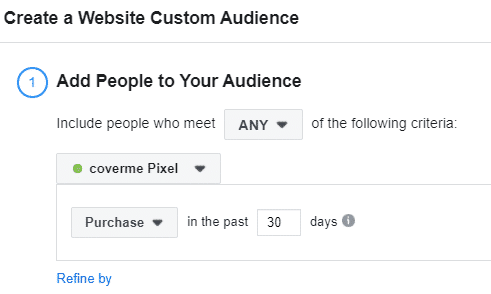
2. Everyone who searched on your site in the last 30 days:

3. Everyone who initiated checkout on the site:

Advanced Audiences for E-commerce Stores
To scale our budget and increase sales without hurting our cost per conversion, we will build quality audiences using the parameters our pixel sends and essentially use existing data to create new, advanced audiences.
As you may have noticed in the screenshots below, there is a button called “Refine by” that not many people use, which is a shame. I will teach you how to properly and effectively use this tool:
Audience #1 – People who purchased a specific product
You can use Refine by and choose from several options. To choose a specific product, select the URL/Parameter option and choose Content Name (assuming you implemented the pixel dynamically – link to the dynamic remarketing guide on the website.
I would take the top 10 best-selling products on the site and build an audience of people who bought them, and create lookalikes based on them


Audience #2 – People who purchased products in a specific category
I’ll want to create an audience of visitors to a specific category in order to improve my remarketing campaign and drill down to a granular level. For example – if I run a jewelry store and have a necklaces category, I’ll want to create an audience of visitors to the “necklaces” category and try to cross-sell them rings, earrings, or simply remarket to whoever visited the category and did not make a purchase.

Audience #3 – People who purchased products above a certain price
If the average product price on my site is 50-60 NIS, I would want to build an audience of everyone who purchased for over 100 NIS or over 150 NIS in order to capture those people who spend a lot of money on the site.

Audience #4 – People who purchased more than a certain number of times
I’ll want to create an audience of those people who purchased more than a specific number of times. This will help me create quality lookalike audiences of potential buyers. In addition, I can target this audience and show them products they might be interested in purchasing in addition to what they already bought.
Click on Further refine by and select people who bought more than a specific number of times on the site

Audience #5 – People whose purchase amount exceeds a specific sum
I’ll want to create an audience whose purchase amount exceeds a certain sum. For example, if the average order value on my site is 100 NIS, I can create an audience of everyone who purchased products on the site for over 200 NIS, which means this audience has high purchase intent, and I can offer them more expensive products, build a lookalike from this audience, etc.

Audience #6 – People who selected EXPRESS shipping on the site
If you offer multiple shipping methods on the site, create an audience for anyone who chose a specific shipping option – say, express shipping which costs extra. You can analyze the audience in various aspects – they love the product and want it to arrive as fast as possible, are willing to pay extra just to receive the product quicker, etc. We can run an UPSELL/CROSS-SELL campaign for that audience.

Audience #7 – People who made a purchase through a specific platform
If you advertise on Google and other platforms, each platform has its own identifier. For example: Google gclid, Facebook fbclid.
You can split audiences and run A/B testing on them.
Audience that purchased from Google
Audience that purchased from Facebook
Audience that purchased from LinkedIn
For example, I’d want to create an audience of people who purchased from Google in order to build an audience with very high purchase intent.

Audience #8 – People who made a purchase through a specific UTM
If you place a UTM (Google Analytics tracking link) on your ads, you can target a specific audience using the URL. If they purchased through a post, a banner, or WhatsApp – you can split the audiences and work with them more smartly.
For those advertising on Facebook – I highly recommend using dynamic parameters, allowing you to create audiences based on parameters. For example – if my ad set is called Jewelry Interests, it brought me a lot of purchases, and it performs well, I’ll want to scale it and duplicate this audience. Because I send dynamic parameters through the Facebook pixel, purchases come in with the URL containing “jewelry”. Therefore, I will create such an audience and make a lookalike from it, ensuring we can always properly scale well-performing ad sets and gain a new, high-quality audience.

Audience #9 – Visitors by visit duration
How does it work? Your site receives 100,000 visitors over the last 30 days. These visitors are listed (hypothetically) in order of time spent on your site. So the first person spent the most time on your site during those 30 days. Let’s say they spent 10 hours. The last person spent the least amount of time. Let’s say they spent one second.
To create an audience of the top 25% most active users on your site, Facebook takes the top 25,000 in this case.

Notes
- Audiences can also be split by Desktop/Mobile users and device type.
- Events and parameters sent to the pixel will not work in every ad account or on every website unless you actively implement them in the code. You need to configure and send these events to the Facebook pixel via code/plugin/developer, etc. Here is a guide on setting up dynamic remarketing on Facebook
- For WordPress users – it is recommended to use the PIXELYOURSITE plugin which will take care of all the infrastructure and do everything for you automatically.
Summary
Everyone knows how to build basic audiences for Facebook marketing, but building smart audiences based on purchase intent, returning customers, or customers who spend more money than others on the site—these are audiences that will bring you more money and help you build higher-quality lookalike audiences. There are many options for creating smart audiences—think about what characterizes your best customers and which products make your business profitable, and build audiences accordingly.
Good luck!
A Bit About Me
Guy Margi, 26 years old, expert in managing digital campaigns across a variety of channels.
