So, what are Automatic Google Ads Extensions?
Automatic Google ad extensions are extensions created by the Google algorithm. These extensions can “take” various search terms and dynamically create them into information segments / links for your website, to appear under the ad you created in the campaign. Most of the automatic extensions can appear in all types of ads, but some can be displayed only on mobile or desktop devices.
There are seven types of automatic extensions that can be added to your Google ads
- Automatic Call Extensions – when the system recognizes that one of the goals of your website is to call your business, it may add automatic call extensions to your ad.
- Automatic Messaging Extensions – the system may define automatic messaging extensions in your ad, should it recognize that one of the goals of your website is to message your business.
- Dynamic Sitelinks Extensions – links to popular suggestions and various contents in your website.
- Structured Snippet Extensions – Structured snippet extensions present additional information about various categories in your website
- Automatic Location Extensions – the objective of the following extension is to assist people searching for your business in a few levels: In terms of directions, the extension displays a map that includes a route to your business or mentions the distance from the user’s location to the business location. In addition to the route instructions, this extension may include a business phone number or a direct contact button from the mobile.
- Seller rating extensions appear in your ad generated by sources Google relies on or by surveys conducted by Google.
- Callout extensions – Callout extensions from your website display in your ad short phrases about their characteristics benefits and offers.
Minimal control of the results
If you are unaware of it by now you have extensions in your ads at this moment! Google automatically adds these extensions for your ads. Notice that extensions can appear in place of the extensions you created.
The addition of these extensions significantly reduces our level of control as advertisers over the results of the campaign and prevents the ability to perform maximal optimisation.
Other than that Google does not provide essential information regarding the performance of the automatic extensions.
Where can we see the extensions?
- click extensions in the right-hand menu
- Choose the option in the top menu (next to the extension tab)
How can we stop extensions?
Even though Google claims to improve the campaign results using the automatic extensions – we have explained the reasons we are better off not relying on this tool as advertisers.
Remember that a negative review, for instance, may trigger people to think twice before clicking on your ad, and thus significantly harm the campaign results.
In any case, if you decide that you are not interested in these extensions, Google will make it very difficult for you to find the option to cancel them, but this is what I am here for.
How to Add or Remove Automatic Extensions?
There are two ways to stop or remove automatic extensions:
One way is to simply add manual extensions to your campaign. For instance, Google prefers to display a review extension and a sitelink extension over automatic rating extensions or dynamic sitelink extensions. It is important to know that this step does not ensure the prevention of the appearance of the automatic extensions. What you can do to ensure they do not appear is to remove them manually, the following way:
- Choose the relevant campaign you wish to remove the extensions from.
- Click ads and extensions in the right hand menu
- Choose the automatic extension tab in the top menu
- Click more in the left hand part of the upper menu, and then click advanced options.

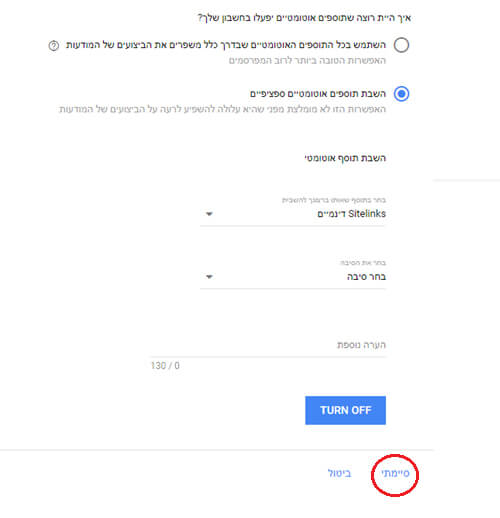
5. At this point, the following window opens. Choose ‘Turn off specific automated extensions’ and then fill in the relevant following fields. To finish, click done.
Summary
Notice that before you perform the removal of the automatic extensions, you should check if you should perform this action.
In the automatic extensions tab you can view all the data of the automatic extensions added to your campaign and decide whether or not you want to remove them, according to their performance. In any case, in cases where you see a negative rating, no second thought is needed, and you should remove the extension immediately.
About me
Reut, 24 years old, manages campaigns in a variety of channels.