


Start keyword research in Keywords Explorer and read Ahrefs’ metrics directly. Review pricing, analyze competitors, audit content gaps, and apply advanced SEO techniques.
What is Ahrefs and who uses it?
Ahrefs is a SaaS platform founded in 2011 to analyze backlinks. It provides a wide range of SEO tools today. Its primary use remains analyzing a website’s backlink profile, checking ranked keywords, and reviewing overall site SEO. Marketers use it to track search engine rankings, build links, research keywords, and analyze competitors.
Professionals use Ahrefs daily to evaluate website SEO health. They check the Ahrefs backlink index to see which domains point to high-performing pages. The software serves these main user groups:
- Small business owners doing SEO for their own businesses
- SEO agencies and companies working with a large volume of clients
- In-House SEO specialists optimizing the websites of the company they work for
- Affiliate marketers managing multiple different websites
- SEO consultants advising and building SEO strategies for clients.
Ahrefs pricing and plan limits
Ahrefs does not offer discounts or free trials. Website owners can sign up for Ahrefs Free to get limited access to Site Explorer and Site Audit for their own verified properties. You can choose from five monthly paid plans: Starter at $29, Lite at $129, Standard at $249, Advanced at $449, and Enterprise at $1,499. Paying annually saves up to 17 percent.
Account limits depend on your chosen plan. Verified projects have unlimited tracking across all tiers. For non-verified projects, the Lite plan allows 5 projects, 750 tracked keywords, 100,000 crawl credits, and 6 months of historical data with 1,000 credits per user each month. The Standard plan includes 20 non-verified projects, 2,000 tracked keywords, 500,000 crawl credits, 2 years of history, and unlimited credits per user.
The Advanced plan provides 50 non-verified projects, 5,000 tracked keywords, 1,500,000 crawl credits, 5 years of history, and the Looker Studio integration. The Enterprise plan offers 100 non-verified projects, unlimited historical data, and uncapped API access. Both API and MCP access are available on all paid plans from Lite upwards. Tools like Content Explorer and Batch Analysis start at the Standard tier.
Glossary of key terms and metrics
Ahrefs includes several metrics to evaluate website performance. The software does not explain its metrics well to new users, and the question-mark tooltips lack clarity. I compiled a glossary of the 10 most relevant terms in Ahrefs:
- URL Rating (UR): The link authority of the web page, calculated by the quality and quantity of links pointing to it.
- Domain Rating (DR): The strength of the whole domain’s backlink profile. It is the equivalent metric to DA (Domain Authority).
- Anchors: A breakdown of the common anchor texts in the website’s backlink profile.
- Referring Domains (RD): The number of different unique websites linking to the page or domain you are checking. A high number of referring domains increases DR and improves rankings on Google.
- CTLDs Distribution: A breakdown of the links the site receives sorted by top-level domain extension like .com or .net.
- Ahrefs Rank: A global ranking of your website’s backlink profile. A lower rank indicates a stronger backlink profile.
- Parent Topic: A broad topic that contains related keywords within it. For example, the keyword “SEO” sits under the Parent Topic “SEO”.
- Traffic Potential: The estimated amount of traffic you might receive if you rank in first place for the keyword.
- Keyword Difficulty: An estimate of how hard (or easy) it is to rank on the first page for the keyword.
- Also Rank For: A list of additional terms that rank on the same page. For example, a page that ranks for “dropshipping” can also rank for “what is dropshipping”.
Keyword research with Keywords Explorer
Keyword research reveals which words fit your project and evaluates their search volume before optimization begins. You choose a search engine and a target country in the Keywords Explorer tool. The overview looks like other keyword tools, such as Google’s keyword tool, and helps you decide which keywords are worth targeting.
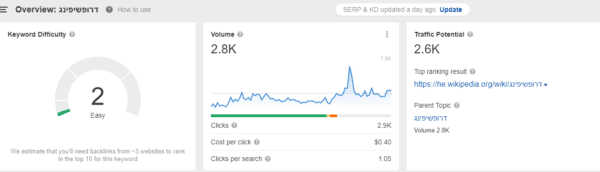
The overview displays Clicks, Cost per click, and Clicks per search. Focus on clicks rather than just search volume. Google regularly adds SERP features like Q&As, video carousels, and “People Also Ask” boxes. These features reduce the percentage of searches that result in a click. Take the keyword Google Advertising as an example.

The search volume for this phrase is 1,400, but the monthly number of clicks it receives is only 826. An organic SEO specialist focuses on clicks because they represent actual expected visits. Search volume only counts queries typed into the engine, even if users take no further action.
The Keyword Ideas tool does not brainstorm completely new keywords well. It expands the keyword you already entered. That is one reason I prefer to do broad keyword research in Google Keyword Planner, which expands the keyword much further. For long-tail keywords to add next to a page’s main keyword, Keyword Ideas works well. Click “View All” to open the full list and find long-tail keywords you had not considered.

SERP overview and search engines
The Search Engine Results Page (SERP) overview sits at the bottom of the analysis page. It displays the top pages ranking for your keyword and tracks their historical movement.

The SERP history graph plots ranking changes since Ahrefs began collecting data on the keyword, usually from 2016. The dropshipping example shows a keyword with frequent result changes, marking it as a non-core keyword. The core phrase Google Advertising remains stable by contrast.

Scanning the SERP helps you estimate your chances of reaching the first page for a keyword. A static SERP indicates you will struggle to displace the top results without a massive budget. A volatile SERP means Google is still testing results and gives you a better opportunity to rank. Keywords Explorer also breaks down the top 10 results by specific SEO metrics like DR, UR, and external links.


Organic keywords and traffic value
Site Explorer analyzes the organic keywords and search traffic for any website. Enter a URL to see the exact terms a domain ranks for and its current position. These metrics compare your site against competitors. The real value lies in the competitor’s complete keyword list.
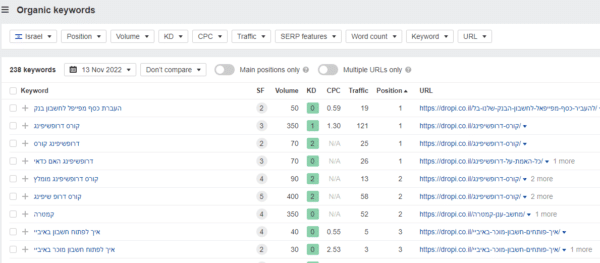
A competitor’s ranked terms shorten your own keyword research process. You get a complete profile of terms relevant to your niche instead of guessing random phrases. Estimate keyword difficulty by checking the competitor page’s content quality, external links, and domain strength.
The Traffic Value feature displays the estimated monetary worth of the organic traffic arriving at a site. Traffic from informational searches often lacks financial value. Terms with commercial intent make the traffic highly valuable. Website owners with large traffic volumes need to focus on purchasing intent to generate more revenue.

Content Explorer and Content Gap
Content Explorer locates popular online content. It ranks content by social shares rather than backlinks, similar to BuzzSumo. Search for a topic to see the leading web pages for that keyword. A search for the keyword Pipedrive in the example below shows the main software website followed by large review sites.

Marketers use Content Explorer primarily to find highly shared pages. Enter a topic to generate a list of the most successful articles.

The search filters include relevance, site DR, number of referring domains, page traffic, whole-website traffic, page traffic value, and website traffic value. You can filter results by specific social networks. Content traffic value equals the quality and commercial value of the keywords multiplied by the visitors coming through them. Page traffic value applies to the specific scanned page. Website traffic value applies to the main URL. The ‘Republished’ filter identifies older posts that were recently updated and highlights topics with long-term visitor interest.
The Content Gap tool compares your site against competitors to find keywords they rank for and you miss. Reverse the website URLs to check the opposite direction. I recommend entering multiple competitors into this crawl. I found about 350 content-gap keywords my site was missing during one analysis of three direct competitors.

Competitor analysis tools
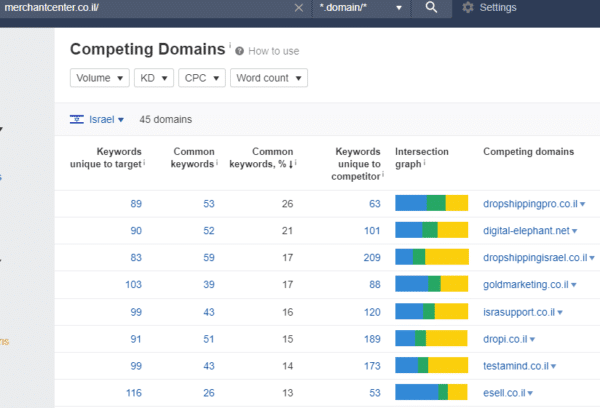
The Competing Domains feature overviews sites competing against you in Google’s organic results. The tool shows the number of identical keywords, the percentage overlap, and the unique terms for both sides. SEO professionals use this report to quickly evaluate the main competitors for new client sites.
The Domain Comparison tool runs a direct head-to-head evaluation of 2 to 5 domains. It breaks down their backlink profiles in detail. You can compare DR, total backlinks, domain extensions, follow or nofollow status, and text versus image links.

Site Audit, paid ads, and Alerts
Site Audit operates as a visual alternative to software like Screaming Frog. It runs technical analyses of your site and tracks issues over time within a dedicated project. Site Audit highlights broken internal links, dead redirects, and pages blocked by a robots.txt file or a noindex tag.

Ahrefs offers a Paid Search view alongside its organic search features. Enter a URL, return to Overview, and click Paid Search. The bottom report shows the exact ads driving the most traffic to the site.

The left menu lets you drill down into Paid Keywords, Ads, or Paid Pages for a detailed breakdown. You gain a clear view of a specific site’s entire paid strategy.
The Alerts feature tracks new developments for your projects and competitors automatically. Set up email notifications to trigger when you or a competitor gains a new backlink or earns rankings for additional keywords. Alerts also tracks new online content published around your chosen keywords.

Advanced tips for Ahrefs
Ahrefs contains multiple features to optimize websites for search engines. I recommend applying four advanced techniques to extract the most value from the data.
1. How to quickly find broken links
Ahrefs locates broken external links pointing to your site, dead outbound links, and broken internal pages. Finding these errors directly in Ahrefs removes the need to run separate analyses in external auditing software.

2. How to analyze link anchor texts
Many SEO professionals claim that building links only with exact match keyword anchors can harm your organic SEO and rankings. Use a variety of anchor texts when you build links. Click the Anchors report in the left menu to check your exact anchor text distribution.

3. How to view pages that continuously receive links
The ‘Best by link growth’ option sits at the bottom of the left menu. The report details which specific pages acquire new backlinks on a daily, weekly, or monthly basis. You can review a competitor’s active marketing strategy and see exactly which pages they prioritize for rankings.

4. Analyzing multiple sites simultaneously
The Batch Analysis feature pulls metrics for up to 200 URLs per report on the Standard plan, 500 on Advanced and 1,000 on Enterprise. SEO specialists use it to optimize large websites or analyze heavily competitive niches. The results match a standard Ahrefs site analysis. Every entered site receives metrics like DR, number of ranking keywords, average monthly organic traffic, AR (Ahrefs Rank), and referring domains.

Is Ahrefs better than Semrush?
Semrush is a competing SaaS platform built as an all-in-one tool for marketers and advertisers. In my view it is the better fit for marketers who run frequent PPC campaigns. Semrush started as an organic SEO tool and shifted focus toward PPC over the years, though Semrush’s CEO maintains it handles both SEO and PPC. Semrush provides four key features:
- Content optimization for better SEO
- Analysis of competitors’ PPC campaigns (recommended)
- Daily keyword tracking
- Social media account tracking
Both systems perform well, but I prefer Ahrefs. Its focus on organic SEO and backlink analysis makes it my tool of choice. At the same time, many marketers and SEO specialists prefer to work with Semrush.

Conclusion
Ahrefs carries a high monthly price, especially in the advanced plans. The software remains worthwhile for SEO professionals. It delivers the keyword, backlink, content, and competitor data required to improve a website’s search engine visibility.
Frequently Asked Questions
How much does Ahrefs cost per month?
Ahrefs offers five paid plans ranging from the $29 Starter tier to the $1,499 Enterprise tier. Paying annually provides a discount of up to 17 percent.
Does Ahrefs offer a free trial?
Ahrefs does not offer free trials or discounts. You can sign up for Ahrefs Free to get limited access to Site Explorer and Site Audit for your own verified websites.
What is the difference between Domain Rating (DR) and URL Rating (UR)?
Domain Rating (DR) measures the strength of the whole domain’s backlink profile and is the equivalent metric to DA (Domain Authority). URL Rating (UR) evaluates the specific link authority of an individual page based on its incoming links.
Which search engines does Ahrefs Keywords Explorer support?
Keywords Explorer supports keyword research for YouTube, Amazon, Bing, Yahoo, Yandex, and Baidu alongside Google.
Should I choose Ahrefs or Semrush?
Ahrefs stands out as the stronger choice for organic SEO and backlink analysis in my experience. Marketers often prefer the all-in-one Semrush platform for running and analyzing PPC campaigns.
About the Author
Dvir Naaman, 27 years old, graduate of the Digital Marketing course at HackerU College. Experienced in building WordPress websites, paid advertising on Google, Facebook, YouTube, and TikTok platforms. Specializes in organic SEO at the Fialkov Digital agency. Has rich experience in eCommerce and dropshipping, and is the owner of Merchant Center – a website aggregating information on eCommerce and advanced marketing systems to increase business conversions with an emphasis on sales in an eCommerce store.
