


Rules, Experiments, and Scripts - How can you automatically improve your Google campaigns using scripts?
At the Update Upgrade 2019 conference, Avishai Freund gave a lecture on how we can automatically improve our Google campaigns. Using rules, experiments, and scripts, we can maximize our results. All details below.
Automated Rules
Also called automated rules / bulk actions, their purpose is to perform certain actions automatically, within a defined time frame, such as once a day / a week / a day of the month.
Examples:
When the campaign cost reaches 6,000 NIS this month, pause advertising
Send an email every morning with search terms that have a quality score below 3.
So how do we do this?
– Go to the Campaigns / Ad Groups / Keywords level
– Select the desired item (campaign, ad group, keywords – you can select one or more)
– Click on “More” (the three dots):

– Click on Create an automated rule:
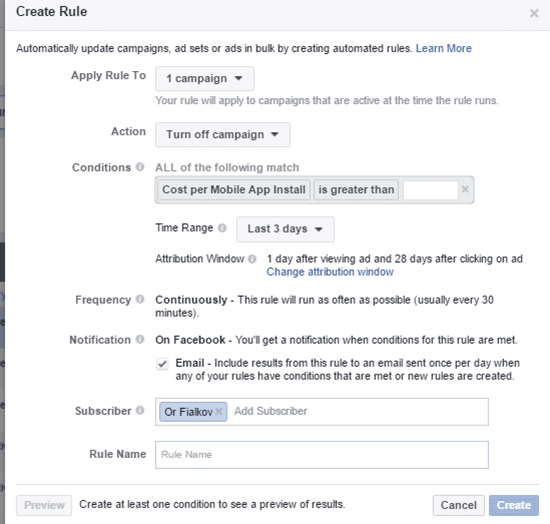
First Example
– Every day at 6:00 AM the rule will run – if Campaign X has spent 6,000 NIS to date -> pause the campaign.

What did we choose?
– We chose to pause the campaign
– You can choose any campaign you want
– Set the condition
– Set the action frequency and the attribution period

Second Example
– Send an email every morning with all keywords that have a quality score lower than 3.
– Go to Keywords.
– Choose send an email.


Experiments
– Today, Google provides us with a wide range of recommendations for account management.
– To switch between strategies, navigate through the menu:
“Campaign”, then “Settings”, then “Bidding”:

How to run an experiment?
First, create a draft, then define the experiment, and then make the decision:
Step 1:
– At the bottom of the menu, select Drafts & Experiments
– In the resulting screen, add a new draft

– Name the draft and save:

– The draft will appear in the menu below.
– Select it (hover/click on it), and choose Drafts & Experiments again.
– Choose New Experiment.
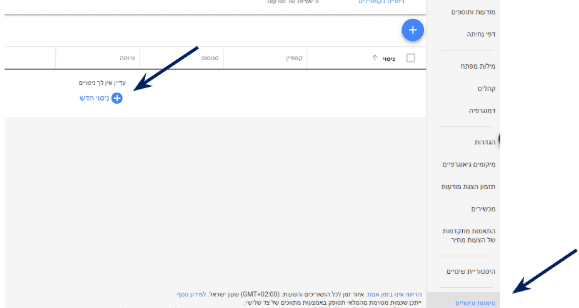
Step 2 – Creating the Experiment:
– Now we will fill in the details.
– Originally, the campaign strategy was manual CPC; I want to test switching to a Target CPA strategy.
– The experiment will run on half of the traffic.
– The experiment will last about two weeks (5/2 to 22/3).
– Save.

– Connect the campaign

– The experiment has started:


Notes:
– You can pause the experiment at any time.
– If the experiment was successful and you don’t want to wait, you can apply the experiment.

Scripts
What is a script, essentially?
– A script is a piece of code that performs an automated action; there are many scripts available for download online.
– The script runs on Google’s servers.
– The script can run on a single account or across your entire MCC
Installing an Account-Level Script

The First Script:
– The script monitors active ads and checks their status; if the link is broken – sends a report + option for immediate pause.
– Script name: (R) Ads Final URL Monitor (Pause + Report).
– Two parameters:
1. Email to which the report will be sent
2. Whether to pause ads or not (report only)
– Account-level script.
– Note: At a certain point, you will be asked to grant permissions.
You can copy the script from here:
var EMAIL = '[email protected]';
var PAUSE = false;
function main(){
var htmlService = HTMLBuilderService();
var ads = AdWordsApp.ads()
.withCondition('CampaignStatus = ENABLED')
.withCondition('AdGroupStatus = ENABLED')
.withCondition('Status = ENABLED')
.withCondition('Type NOT_IN [CALL_ONLY_AD]') // IMAGE_AD, MOBILE_AD, MOBILE_IMAGE_AD, PRODUCT_AD, RICH_MEDIA_AD, TEMPLATE_AD, TEXT_AD, CALL_ONLY_AD
.withLimit(4)
.get();
Logger.log('%s ads found.', ads.totalNumEntities());
var matches = 0;
while(ads.hasNext()){
var ad = ads.next();
var adURL = ad.urls().getFinalUrl();
var adHeader = ad.getHeadline();
var adType = ad.getType();
Logger.log('ad: %s (%s)', adHeader, adType);
var statusCode = -1;
try{
var response = UrlFetchApp.fetch(adURL, { muteHttpExceptions: true });
statusCode = response.getResponseCode();
Logger.log('[status %s] %s', statusCode, adURL);
}
catch(e){
Logger.log('[exception %s] %s', e.message, adURL);
}
// OK
if(statusCode == 200 || statusCode == -1)
continue;
var adgroup = ad.getAdGroup();
var adgroupName = adgroup.getName();
Logger.log('adgroup: %s', adgroupName);
Logger.log('%s [%s]', adURL, statusCode);
matches++;
htmlService.add(
'statusCode: ' + statusCode +'
' +
'adGroup: ' + adgroupName +'
' +
'adURL: ' + adURL + '
'
);
if(PAUSE)
{
Logger.log('ad paused');
ad.pause();
}
}
if(matches > 0){
MailApp.sendEmail(EMAIL, 'Ad Monitor', '', {
htmlBody: htmlService.get()
});
}
}
var HTMLBuilderService = function(){
var _html = '';
return {
add: function(content){
_html += content;
},
get: function(){
return _html;
}
};
}
Name the script, grant permissions, and paste the script:

Enter your email and whether to pause or not:

Click on Scripts, select the script execution frequency

You can see in the script history when the script ran and what action it performed:

Second Script – Monthly Reporting:
– Script name: (R) Account Daily Stats + Charts – Current Month)
– Script purpose: To create a neat Excel sheet with charts.
– The script creates a Google Sheet file inside Google Drive.
– At the top of the script, specify the file name you want.
– If the file does not exist, the script generates it automatically; if the file exists, the script updates it.
– Account-level script.
You can copy the script from here:
var SPREADSHEET = 'AccountDailyStats';

function main() {
  var sheetService = SpreadsheetLoader.loadSheetService(SPREADSHEET);
  if(!sheetService) // create the sheet
    sheetService = SpreadsheetLoader.createSheetService(SPREADSHEET);

  sheetService.clear();

  Logger.log('Loading "%s" Account Statistics ...', AdWordsApp.currentAccount().getName());
  var report = AdWordsApp.report(
     'SELECT Date, Impressions, Clicks, ConversionRate, Cost ' +
     'FROM   ACCOUNT_PERFORMANCE_REPORT ' +
     'DURING THIS_MONTH');

  report.exportToSheet(sheetService.sheet);
  sheetService.sort(1);

  SetTotals(sheetService);

  if(!sheetService.hasCharts)
    DrawChart(sheetService);

  Logger.log('Done!');
}

function SetTotals(sheetService){

  // TOTALS (using formulas)
  Logger.log('Setting formulas ...');

  var lastRowIndex = sheetService.getLastRowIndex();
  var totalRowIndex = (parseInt(lastRowIndex) + 1).toString();

  sheetService.setCellSumFormula('B2:B'.concat(lastRowIndex), 'B'.concat(totalRowIndex));
  sheetService.setCellSumFormula('C2:C'.concat(lastRowIndex), 'C'.concat(totalRowIndex));
  sheetService.setCellAvgFormula('D2:D'.concat(lastRowIndex), 'D'.concat(totalRowIndex));
  sheetService.setCellSumFormula('E2:E'.concat(lastRowIndex), 'E'.concat(totalRowIndex));
  sheetService.setDataUI('A'.concat(totalRowIndex, ':E', totalRowIndex), '#F5F6F9', '#000000', 20, 'center');
}

function DrawChart(sheetService){
  Logger.log('Drawing Chart ... ');

  var lastRowIndex = sheetService.getLastRowIndex();

  // arrRanges, vAxisDataLeft, vAxisDataRight, width, height, rowPosition, columnPosition, chartTitle
  // vAxisData: { title, ticks, color, legend }
  sheetService.addLineChartDualY(
    ['A2:A'.concat(lastRowIndex), 'B2:B'.concat(lastRowIndex), 'C2:C'.concat(lastRowIndex)],
    {
      title: 'impressions',
      color:'#4572A7',
      legend:'impressions'
    },
    {
      title: 'clicks',
      color:'#AA4643',
      legend:'clicks'
    },
    700, 160, 3, 7, // chart location - row 3, column 7
    'impressions vs clicks'
  );

  sheetService.addLineChartDualY(
    ['A2:A'.concat(lastRowIndex), 'D2:D'.concat(lastRowIndex), 'C2:C'.concat(lastRowIndex)],
    {
      title: 'conv.Rate',
      color:'#4572A7',
      legend:'conv.Rate'
    },
    {
      title: 'clicks',
      color:'#AA4643',
      legend:'clicks'
    },
    700, 160, 11, 7, // chart location - row 10, column 7
    'conv.Rate vs clicks'
  );

  sheetService.addLineChartDualY(
    ['A2:A'.concat(lastRowIndex), 'E2:E'.concat(lastRowIndex), 'C2:C'.concat(lastRowIndex)],
    {
      title: 'cost',
      color:'#4572A7',
      legend:'cost'
    },
    {
      title: 'clicks',
      color:'#AA4643',
      legend:'clicks'
    },
    700, 160, 19, 7, // chart location - row 17, column 7
    'cost vs clicks'
  );
}

/* SPREADSHEET SERVICE */
var SpreadSheetService = function(spreadSheet) {
  var _spreadSheet = spreadSheet;
  var _sheets = [];

  (function(){
    var sheetServices = [];
    var temp_sheets = spreadSheet.getSheets();
    for(var i= 0; i < temp_sheets.length; i++)
      _sheets.push(new SheetService(temp_sheets[i]));
  })();

  return {
    sheets: _sheets,
    getActiveSheet: function(){
      return SheetService(_spreadSheet.getActiveSheet());
    },
    getSheetByName: function(sheetName) {
         for(var i= 0; i < _sheets.length; i++)
            if(_sheets[i].sheetName == sheetName)
              return _sheets[i];
          return '';
    },
    addNewSheet: function(sheetName){
        var new_sheet = SheetService(_spreadSheet.insertSheet(sheetName));
        _sheets.push(new_sheet)
        return new_sheet;
    },
    isSheetExists: function(sheetName){
        return this.getSheetByName(sheetName) != '';
    },
    getURL: function(){
      return _spreadSheet.getUrl();
    },
	getId: function(){
      return _spreadSheet.getId();
    }
  };
}

/* SHEET SERVICE */
var SheetService = function(sheet) {
  var _sheet = sheet;

  var setFormat = function(strRange, format){
    var range = _sheet.getRange(strRange);
    range.setNumberFormat(format);
  }

  var buildLineChart = function(arrRanges, series, vAxes, width, height, rowPosition, columnPosition, chartTitle){
       var chartBuilder = _sheet.newChart();

       for (var i in arrRanges)
         chartBuilder.addRange(_sheet.getRange(arrRanges[i]));

       chartBuilder
       .setChartType(Charts.ChartType.LINE)  // chart type - line
       .setPosition(rowPosition, columnPosition, 0, 0)  // chart location row X column Y

       .setOption('animation.duration', 500) // animation
       .setOption('width', width)
       .setOption('height', height)
       .setOption('legend', { position: 'bottom', alignment: 'center' })
       .setOption('hAxis.textPosition', 'none') // hide hAxis labels (options: out, in, none)
       .setOption('series', series)  // parameter
       .setOption('vAxes', vAxes) // parameter

       if(chartTitle)
         chartBuilder.setOption('title', chartTitle);

       _sheet.insertChart(chartBuilder.build());
  }

  return {
    sheet: _sheet,
     hasSheet: _sheet != null,
     sheetName: _sheet ? _sheet.getName() : '',
     getLastRowIndex: function(){ return _sheet.getLastRow();},
     getLastColumnIndex: function(){ return _sheet.getLastColumn();},
     getValue: function(rowPosition, columnPosition){
       return _sheet.getRange(rowPosition, columnPosition).getValue();
     },
     getValues: function(){
       return _sheet.getDataRange().getValues();
     },
     getRowValues:function(rowPosition){
       return _sheet.getRange(rowPosition, 1, 1, this.getLastColumnIndex()).getValues();
     },
     getRowIndex: function(columnPosition, key){
       var rows = _sheet.getDataRange().getValues();

       // row index is 0 based but range is 1 based
       for(row in rows)
         if(rows[row][columnPosition - 1] == key)
           return parseInt(row) + 1;
       return -1;
     },
     getRowIndexBy2Columns: function(columnAPosition, keyA, columnBPosition, keyB){
       var rows = _sheet.getDataRange().getValues();

       // row index is 0 based but range is 1 based
       for(row in rows)
         if(rows[row][columnAPosition - 1] == keyA && rows[row][columnBPosition - 1] == keyB)
           return parseInt(row) + 1;
       return -1;
     },
     getColumnValues: function(startRowPosition, columnPosition){
        // getRange(row, column, numRows, numColumns)
        return _sheet.getRange(startRowPosition, columnPosition, _sheet.getLastRow() - 1, 1).getValues();
     },
     addRow: function(arrValues){
       //_sheet.appendRow(arrValues);
       this.addRowAtIndex(arrValues, _sheet.getLastRow() + 1);
     },
     addRowAtIndex: function(arrValues, rowPosition){
        rowPosition = rowPosition || _sheet.getLastRow() + 1;
        var range = _sheet.getRange(rowPosition, 1, 1, arrValues.length);
        range.setValues([arrValues]);
     },
     addLineChart: function(arrRanges /* range format: 'B15:B24' */, vAxisData /* { title, ticks, lines[]{color, legend}  } */, width, height, rowPosition, columnPosition, chartTitle){
       var series = [];
       for (var i in vAxisData.lines)
         series.push({
           color: vAxisData.lines[i].color,
           labelInLegend : vAxisData.lines[i].legend,
           pointShape: 'square',
           pointSize: 4,
           targetAxisIndex: 0 // only one vAxis (index 0)
         });

       var minValue = 0;
       if(vAxisData.ticks) // custom vAxis values
         // set minimum value to be the minimum tick value
         minValue = Math.min.apply(null, vAxisData.ticks).toFixed(0);

       var vAxis = {
         ticks: vAxisData.ticks, // null for default
         title: vAxisData.title,
         minValue: minValue,
         viewWindow: { min: minValue }
       };

       var vAxes = [];
       vAxes.push(vAxis); // only one vAxis (index 0)

       buildLineChart(arrRanges, series, vAxes, width, height, rowPosition, columnPosition, chartTitle);
     },
     addLineChartDualY: function(arrRanges /* range format: 'B15:B24' */, vAxisDataLeft /* { title, ticks, color, legend } */, vAxisDataRight, width, height, rowPosition, columnPosition, chartTitle){
       var series = [];

       series.push({
           color: vAxisDataLeft.color,
           labelInLegend : vAxisDataLeft.legend,
           pointShape: 'square',
           pointSize: 4,
           targetAxisIndex: 0 // vAxis (index 0)
       });

       series.push({
           color: vAxisDataRight.color,
           labelInLegend : vAxisDataRight.legend,
           pointShape: 'square',
           pointSize: 4,
           targetAxisIndex: 1 // vAxis (index 1)
       });

       var minValueLeft = 0;
       if(vAxisDataLeft.ticks) // custom vAxis values
         // set minimum value to be the minimum tick value
         minValueLeft = Math.min.apply(null, vAxisDataLeft.ticks).toFixed(0);

       var vAxisLeft = {
         ticks: vAxisDataLeft.ticks, // null for default
         title: vAxisDataLeft.title,
         minValue: minValueLeft,
         viewWindow: { min: minValueLeft }
       };

       var minValueRight = 0;
       if(vAxisDataRight.ticks) // custom vAxis values
         // set minimum value to be the minimum tick value
         minValueRight = Math.min.apply(null, vAxisDataRight.ticks).toFixed(0);

       var vAxisRight = {
         ticks: vAxisDataRight.ticks, // null for default
         title: vAxisDataRight.title,
         minValue: minValueRight,
         viewWindow: { min: minValueRight }
       };

       var vAxes = [];
       vAxes.push(vAxisLeft); // vAxis (index 0)
       vAxes.push(vAxisRight); // vAxis (index 1)

       buildLineChart(arrRanges, series, vAxes, width, height, rowPosition, columnPosition, chartTitle);
     },
     addImageFromURL: function(url, rowPosition, columnPosition, top, left){
       top = top || 0;
       left = left || 0;

       _sheet.insertImage(url, rowPosition, columnPosition, left, top);
     },
     deleteRow: function(rowPosition){
       _sheet.deleteRow(rowPosition);
     },
     sort: function(columnPosition){
       _sheet.sort(columnPosition);
     },
     hasCharts:  _sheet.getCharts().length > 0,
     findColumnValuesByFilter: function(columnPosition, filterValue, filterColumnPosition){
       /*
          get column values filtered by other column

          e.g: findColumnValuesByFilter(2, '100', 1)
          all B column values that the value in A column equals to '100'
       */

       var result = [];
       var rows = _sheet.getDataRange().getValues();

       for(row in rows)
         if(rows[row][filterColumnPosition - 1] == filterValue)
           result.push(rows[row][columnPosition]);
       return result;
     },
     clear: function(charts, format, contents){
       charts = charts || false;
       format = format || false;
       contents = contents || true;

       if(!charts) return;

       // clear all charts
       _sheet.clear({ formatOnly: format, contentsOnly: contents });
       var charts = _sheet.getCharts();
       for (var i in charts)
         _sheet.removeChart(charts[i]);
     },
     setValue: function(rowPosition, columnPosition, value){
       _sheet.getRange(rowPosition, columnPosition).setValue(value);
     },
     setRangeValue: function(strRange, value){
       // e.g: setCurrencyFormat('A1'); // set cell
       _sheet.getRange(strRange).setValue(value);
     },
     setDataUI: function(strRange, backgroundColor, foreColor, fontSize, align){
       var range = _sheet.getRange(strRange);
       if(backgroundColor)
           range.setBackground(backgroundColor);
       if(foreColor)
           range.setFontColor(foreColor);
       if(fontSize)
           range.setFontSize(fontSize);
       if(align)
         range.setHorizontalAlignment(align);
     },
     setNumberFormat: function(strRange){
       setFormat(strRange, '0');
     },
     setDecimalFormat: function(strRange){
       setFormat(strRange, '0.00');
     },
     setCurrencyFormat: function(strRange){
       // e.g: setCurrencyFormat('A1'); // set cell
       // e.g: setCurrencyFormat('A1:A10'); // set range

       setFormat(strRange, '$0.00');
     },
     setCellSumFormula: function(strRange, strCell){
       // e.g: setCellSumFormula('A1:A10', 'B1');
       // set SUM value of cells A1 to A10 to cell B1

       var cell = _sheet.getRange(strCell);
       cell.setFormula('=SUM(' + strRange + ')');
     },
     setCellAvgFormula: function(strRange, strCell){
       // e.g: setCellSumFormula('A1:A10', 'B1');
       // set AVG value of cells A1 to A10 to cell B1

       var cell = _sheet.getRange(strCell);
       cell.setFormula('=AVERAGE(' + strRange + ')');
     }
   };
}

/* SPREADSHEET LOADER */
var SpreadsheetLoader = {
  createSpreadSheet: function(spreadSheetName, folderName){
    Logger.log('CREATING %s ... ', spreadSheetName);
    var spreadsheet = SpreadsheetApp.create(spreadSheetName); // create new file

    if(!folderName || folderName == '')
      return spreadsheet; // folder not specified  - return spreadsheet

    // save in specific folder

    for(var i=0;i<500000; i++); // delay

    var root_folder = DriveApp.getRootFolder();
    var folder_iterator = root_folder.getFoldersByName(folderName);
    var folderExists = folder_iterator.hasNext();

    if(!folderExists) // no such folder - return the spreadsheet
    {
      Logger.log('%s NOT EXISTS!', folderName);
      return spreadsheet;
    }

    var folder = root_folder.getFoldersByName(folderName).next();
    var file = root_folder.getFilesByName(spreadSheetName).next();
    folder.addFile(file);
    root_folder.removeFile(file);

    return SpreadsheetApp.openById(file.getId());
  },
  loadSpreadSheet: function(spreadSheetName, folderName){
	if(spreadSheetName == '') {
      Logger.log('EMPTY NAME!');
      return null;
    }

    var root_folder = DriveApp.getRootFolder();
    var folder = root_folder; // default
    if(folderName && folderName != '')
    {
      var folder_iterator = root_folder.getFoldersByName(folderName);
      var folderExists = folder_iterator.hasNext();

      if(folderExists)
      {
        Logger.log('FOLDER %s', folderName);
        folder = root_folder.getFoldersByName(folderName).next();
      }
    }

    var file_iterator = folder.getFilesByName(spreadSheetName);
    var fileExists = file_iterator.hasNext();

    if(!fileExists){
      Logger.log('%s NOT EXISTS!', spreadSheetName);
      return null;
    }

    // file exists - load it
    Logger.log('LOADING %s ... ', spreadSheetName);
    var file = file_iterator.next();
    return SpreadsheetApp.openById(file.getId());
  },
  loadSpreadSheetById: function(spreadSheet_id){
    if(spreadSheet_id == '') {
      Logger.log('EMPTY ID!');
      return null;
    }

    var file = DriveApp.getFileById(spreadSheet_id);
    if(!file || file.isTrashed()){
      Logger.log('%s NOT EXISTS!', spreadSheet_id);
      return null;
    }

    // file exists - load it
    Logger.log('LOADING %s ... ', spreadSheet_id);
    return SpreadsheetApp.openById(file.getId());
  },
  loadSheetService: function(spreadSheetName, folderName){
    var spreadsheet = this.loadSpreadSheet(spreadSheetName, folderName);
    if(!spreadsheet) return null;
    return SheetService(spreadsheet.getActiveSheet());
  },
  loadSheetServiceById: function(spreadSheet_id){
    var spreadsheet = this.loadSpreadSheetById(spreadSheet_id);
    if(!spreadsheet) return null;
    return SheetService(spreadsheet.getActiveSheet());
  },
  loadSpreadSheetService: function(spreadSheetName, folderName){
    var spreadsheet = this.loadSpreadSheet(spreadSheetName, folderName);
    if(!spreadsheet) return null;
    return SpreadSheetService(spreadsheet);
  },
  loadSpreadSheetServiceById: function(spreadSheet_id){
    var spreadsheet = this.loadSpreadSheetById(spreadSheet_id);
    if(!spreadsheet) return null;
    return SpreadSheetService(spreadsheet);
  },
  createSheetService: function(spreadSheetName, folderName){
    var spreadsheet = this.createSpreadSheet(spreadSheetName, folderName);
    if(!spreadsheet) return null;
    return SheetService(spreadsheet.getActiveSheet());
  },
  createSpreadSheetService: function(spreadSheetName, folderName){
    var spreadsheet = this.createSpreadSheet(spreadSheetName, folderName);
    if(!spreadsheet) return null;
    return SpreadSheetService(spreadsheet);
  }
}
Third Script – Handling Non-Converting Ads:
– Script name: R) Pause Non Converting or High Cost Ads)
– Script purpose: To pause ads that do not convert or have a high cost per conversion.
– Account-level script.
You can copy the script from here:
    var PERIOD = 'ALL_TIME'; // ALL_TIME, LAST_30_DAYS

function main() {
  HandleNonConvertingAds();
  HandleConvertingAds();
}

function HandleNonConvertingAds(){
  Logger.log('## Non Converting Ads ##')
  var ads = AdWordsApp.ads()
     .withCondition('ConvertedClicks = 0')
     .withCondition('Status = ENABLED')
     .withCondition('Cost > 0')
     .forDateRange(PERIOD)
     .orderBy('Cost ASC')
     .get();

  while (ads.hasNext()) {
    var ad = ads.next();
    var adGroup = ad.getAdGroup();
    var adGroupCPA = GetAdGroupCPA(adGroup);
    var adCost = ad.getStatsFor(PERIOD).getCost();

    Logger.log('ad: %s -> cost %s', ad.getHeadline(), adCost);
    Logger.log('adGroup %s -> CPA %s', adGroup.getName(), adGroupCPA);

    if(adGroupCPA == null || adCost < adGroupCPA * 2) // no changes require
      continue;

    // adCost is too high - pause the ad
    if(!AdWordsApp.getExecutionInfo().isPreview())
      ad.pause();
    Logger.log('PAUSE THE AD!');
  }
}

function GetAdGroupCPA(adGroup){
  var stats = adGroup.getStatsFor(PERIOD);
  var conversions = stats.getConvertedClicks();
  return conversions == 0 ? 0 : (stats.getCost() / conversions); // calculate the ad "CPA" - cost per converted
}

function HandleConvertingAds(){
  Logger.log('## Converting Ads ##')
  var ads = AdWordsApp.ads()
     .withCondition('ConvertedClicks > 0')
     .withCondition('Status = ENABLED')
     .withCondition('Cost > 0')
     .forDateRange(PERIOD)
     .orderBy('ConvertedClicks DESC')
     .get();

  while (ads.hasNext()) {
    var ad = ads.next();
    var adGroup = ad.getAdGroup();
    var adGroupCPA = GetAdGroupCPA(adGroup);
    var stats = ad.getStatsFor(PERIOD);
    var adCPA = stats.getCost() / stats.getConvertedClicks(); // calculate the ad "CPA" - cost per converted

    Logger.log('ad: %s -> Conversions %s, CPA %s', ad.getHeadline(), stats.getConvertedClicks(), adCPA)
    Logger.log('adGroup %s -> CPA %s', adGroup.getName(), adGroupCPA);

    if(adGroupCPA == null || adCPA < adGroupCPA * 4) // no changes require
      continue;

    // adCost is too high - pause the ad
    if(!AdWordsApp.getExecutionInfo().isPreview())
      ad.pause();
    Logger.log('PAUSE THE AD!');
  }
}
Fourth Script – Hidden Keywords:
– Script name: (R) queries 2 keywords – mcc (set)
– Script purpose: To take search queries that actually converted but do not appear as keywords.
– Explanation: The original keyword match type was phrase match or BMM.
– MCC-level script.
You can copy the script from here:
function main() {
  var accounts = MccApp.accounts().get();

  while (accounts.hasNext()) {
    var account = accounts.next();
    var accountName = account.getName() ? account.getName() : '--';
    Logger.log('account #%s %s', account.getCustomerId(), accountName);

    MccApp.select(account);
    execute();
  }
}

function execute() {
  var report = AdWordsApp.report(
   'SELECT Query,Clicks,ConvertedClicks,AverageCpc ' +
   'FROM SEARCH_QUERY_PERFORMANCE_REPORT ' +
   'WHERE ConvertedClicks > 0 ' +
   'DURING 20000101,' + dateFormat(new Date()));

  var rows = report.rows();
  while(rows.hasNext()) {
    var row = rows.next();

    var clicks = row['Clicks'];
    var conversions = row['ConvertedClicks'];

    var query = row['Query'];
    //Logger.log(query + ' ' + clicks);
    var found_in_my_keywords = AdWordsApp.keywords().withCondition('Text CONTAINS "' + query + '"').get().hasNext();
    if(found_in_my_keywords)
    {
      Logger.log('"' + query + '" found in my keywords');
      continue;
    }

    var adGroup = AdWordsApp.adGroups().get().next();
    var maxcpc = row['AverageCpc'];

    if(!AdWordsApp.getExecutionInfo().isPreview())
      adGroup.createKeyword(query, maxcpc);
    Logger.log('"' + query + '" added as keyword with maxcpc ' + maxcpc)
  }
}

function dateFormat(date){
  var year = date.getFullYear().toString();
  var month = date.getMonth().toString();
  var day = date.getDate().toString();

  if(month.length == 1) month = '0' + month; // return yyyyMMdd
  if(day.length == 1) day = '0' + day;

  return year + month + day;
}
Additional Examples
– Full campaign management based on a feed (Excel, XML, or JSON), from creating a new ad when a new product arrives, for example: “Only today Product X is on sale”, stopping the ad when out of stock, updating the price within the ad
– Budget management to reach exactly the defined budget, no more and no less.
– Data injection into ads
– Alert system for campaign issues
Summary
Avishai Freund
- Manager and Owner of Logos Internet Marketing
- Expert in marketing, advertising, and online promotion
- Consults and accompanies institutional bodies and private entities in all matters related to the internet medium
- Google Certified Professional – Google Advertising Professional
- Senior lecturer at universities and colleges specializing in internet marketing and web technologies
- Serves as a court-appointed expert in the field of advertising and marketing.
- Holds an MBA in Business Administration from the School of Management, Faculty of Engineering, Ben-Gurion University of the Negev, Beer Sheva
