How to set up your first campaign on the Taboola system
Taboola is a content marketing platform for promoting articles, products, services, and anything that can be marketed. Taboola will expose your article to users on the largest content sites in Israel and around the world, integrating promotional content seamlessly into the articles on the site users are browsing. This tool is becoming increasingly relevant for businesses in Israel that want to be exposed to an audience as relevant as possible to their goals. Unlike regular ads we see on the internet, such as banners on content sites or Facebook ads, articles written for advertising on Taboola do not try to “push” to buy the product – but are worded and structured similarly to a real journalistic article.
Who is Taboola advertising suitable for? Taboola articles are especially suitable for business owners targeting a medium or large target audience, consisting of at least several tens of thousands of potential customers. In the case of a relatively small target audience, it is likely that only a few readers will click to read the article – and the money invested in the campaign will not yield enough results.
Content websites in Taboola's network in Israel
These are the content websites in Taboola’s network in Israel:
Explanation of Taboola's advertising platform
The Taboola system looks like this:
How to set up a campaign on Taboola?
First, log in to the Taboola platform, click on Create in the top right corner, and then on Campaign:
Next, a window will open, where we will enter the campaign name and business name, and select the campaign objective we want: Lead Form, Online Purchases, Website Engagement, Brand Awareness, App Installs:
Next, scroll down and choose the campaign timeframe – start as soon as approved, or start on dates you set
Campaign running schedule: run 24/7 (all the time) or by specific hours of the day in which the campaign will appear by clicking on Set Specific Days or Hours
Next, we will proceed to campaign targeting:
Countries/Regions: Where the campaign will be displayed; you can also exclude specific countries or regions.
Then choose whether to advertise to an entire country, regions, cities, or a specific area by zip code.
Platform: Here you can choose which platform to advertise on – Desktop, Mobile, or Tablet. You can also target people who are currently using Wi-Fi
We will continue configuring the settings and reach Operating Systems, where you can choose exactly which operating system to advertise to. You can also choose in which browser the ads will be displayed, as well as block specific sites where you do not want to appear:
In terms of segmentation, there are several types in the system:
My audiences – Target the custom audiences you created from the website, Lookalikes, etc. – you can include audiences or exclude audiences from the campaign:
Marketplace Audiences – Target interests and segments from Taboola’s data. We recommend targeting several audiences, especially if using exclusions, to reach a precise and large target audience.
Contextual – Target related categories based on content taken from publishers’ articles using Taboola’s algorithm.
Next, we will arrive at the page that defines the campaign budget and bidding strategy. Set the budget by: daily, monthly, or lifetime. The system allows you to set a maximum budget for a monthly period and for the lifetime
Taboola’s system has 2 main bidding strategies:
Smart Bid – Taboola automatically adjusts the bid to achieve the best results, based on your campaign goal. The bid will decrease or increase to win impressions most likely to yield conversions.
Fixed Bid – A fixed bid is a manual bidding strategy that leaves bid optimization in your hands. The bid you enter will always be the price you pay.
After setting the desired bid, choose the ad optimization – there are 2 options:
Optimized – This is Taboola’s recommended option; the exposure of the ads will be determined by Taboola’s algorithm, and the best-performing ads will be displayed.
A/B Testing – Ads will be distributed evenly across Taboola’s network, regardless of ad performance. When the A/B test ends, this option will end and automatically switch to Optimized
After that, there is an option to set the maximum cost per acquisition (CPA) you are willing to pay in the campaign. That is, when a user performs a desired action on the landing page/article/site – it is called a conversion. This conversion can be a product purchase, page view, lead submission, newsletter sign-up, or any other conversion. The cost per action or conversion (CPA) is the maximum amount you are willing to pay for each of these actions:
Finally, you can track your campaign and ads using UTM parameters to send data to Analytics. Change the parameters as needed. Please note, when creating a new campaign, Taboola’s default URL parameter is utm_source=taboola&utm_medium=referral – you can edit this as needed:
Creating ads on Taboola
After creating a campaign, we’ll proceed to create the ads and choose between 3 options for building ads:
Variations – Here you can combine multiple titles, descriptions, and images to automatically generate different variations.
One By One – Adding multiple URLs to create new ads in bulk. *Currently supports image ads only.
RSS – Creating new ads using an RSS feed
After choosing your preferred ad display option, select the campaign you created, and enter the URL / landing page / article:
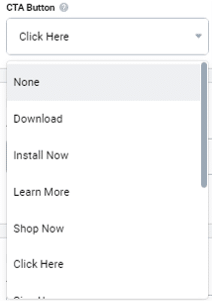
Now we’ll move on to adding the content and how the ad will be displayed – add headlines (you have the option to add up to 10 different headlines). You can also add a description by clicking on the field box and a CTA button
There is a wide variety of calls to action:
Next, we’ll get to adding the image / video (up to 50MB) / GIF or their URL that you want to display:
If you wish, you even have the option to use Taboola’s own image library (you can search by keyword):
Preview and Campaign Launch
Taboola allows you to preview ads before launching the campaign – if you want to edit the cropped images according to each aspect ratio, you can use the image editor. Drag the rectangle to the desired position in the image you want to display.
Finally, you can see in the Preview the final result:
You can test and see how the ad will look on the various websites here:
Ad sizes
Tips
In order to get the most out of your campaigns, it is important to always track your campaigns. This way you can evaluate whether your campaigns are working, and then make changes to improve performance if necessary.
A few recommendations and tips for campaigns:
1. Make sure you are ready with your creative in advance – you can see here Taboola’s recommendations and tips for successful creative on Taboola and recommendations for landing pages/websites you will advertise with here.
2. Split into multiple campaigns according to their goal – device, location, content type, or product, and allocate an appropriate budget for each campaign. 3. Make sure the headlines and text match and suit the landing page you lead to – a mismatch will lead to a quick bounce.
3.Track and optimize campaigns – use the pixel, set CPA and KPIs for campaigns, track results and data, use URL parameters.
4. Use remarketing – increase engagement and conversion rates by setting up remarketing campaigns for people who viewed your content.
5. Use bid adjustments at the publisher site level – closely track which sites bring you high-quality traffic and which sites bring you “junk” traffic – and improve performance.
6. Find competitors’ ads – there are tools through which you can find competitors’ ads for inspiration
Summary
In this article, we learned how to set up your first Taboola campaign, which, unlike many advertising systems, is very simple and user-friendly. Through Taboola, you can promote recommendations for products and services as well as landing pages directly, and with good work, you can create an advertising channel for your clients that will bring good results and sales. A budget is needed to optimize campaigns on Taboola and deliver results, but with the right work, you can build an additional marketing channel.
About the author
Adi Golan, Campaign Manager at Fialkov Digital, specializes in advertising with advanced tools and automations.